
COME Payment Optimization Update: Paytm Deposit Guide
Paytm deposit capacity has been upgraded for steadier payments. Use this six-step visual guide to complete a deposit and submit the correct UTR.

Paytm → UTR → Completed
On this page
Payment optimization update
Match participation has increased recently, which can make some payment methods busier at peak times. COME has optimized and upgraded Paytm deposit capacity to support a steadier payment flow.
If you are ready to deposit, open COME ↗ and follow the current instructions shown for your account.
What has changed for Paytm deposits?
The Paytm route has received a targeted optimization and capacity upgrade. The purpose is to handle higher deposit demand more steadily when match participation is busy. This update improves capacity, but it does not replace the need to complete each on-screen step and submit the correct UTR.
For a broader overview of Wallet and order status screens, see the COME recharge and withdrawal guide.
How to deposit in COME using Paytm
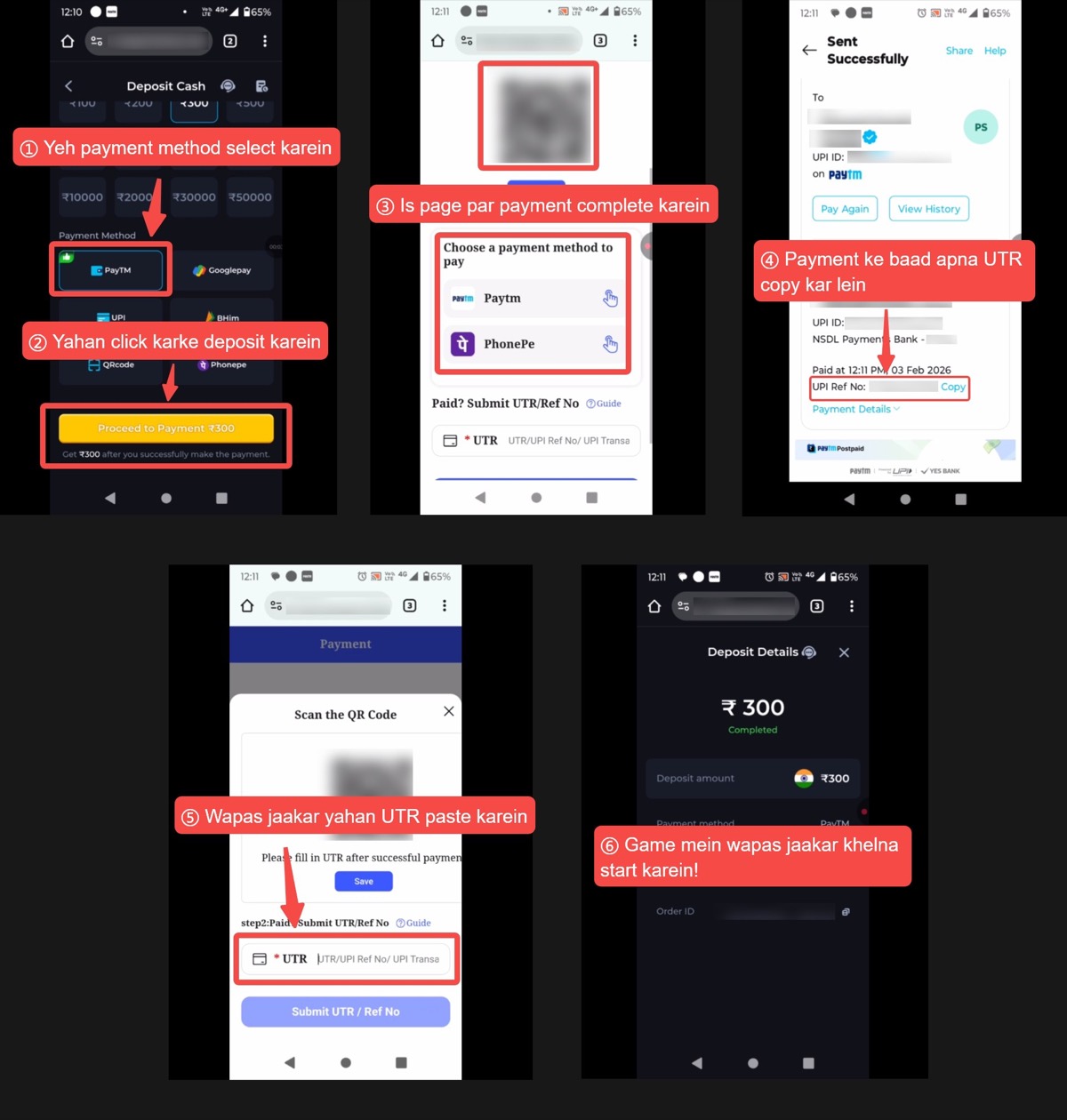
Step 1: Select Paytm under Payment Method
Open Deposit Cash, enter the amount you want to add, and select Paytm under Payment Method. Check that Paytm remains selected before continuing.
Step 2: Select Proceed to Payment
Review the deposit amount displayed on the button, then select Proceed to Payment. Avoid opening a second deposit order while the first order is still active.
Step 3: Complete the payment
On the payment page, check the amount and payee information. Choose Paytm or another UPI option shown on that payment screen and complete the payment in the selected app.
Step 4: Copy the UTR or UPI reference number
After Paytm shows Sent Successfully, find the UPI Ref No on the receipt and copy the full number. This reference is also commonly called the UTR.
Step 5: Return to COME and submit the UTR
Go back to the COME payment page. Paste the copied number into the UTR/Ref No field, check it once, and select Submit UTR / Ref No.
Step 6: Confirm the Completed status
Open Deposit Details and confirm that the order shows Completed and the balance has updated. Once the deposit is complete, return to the match section when you are ready.
Continue with the current Paytm flow
Open COME, create one deposit order, and keep the Paytm receipt available until the order shows Completed.
Open COME ↗Tips for a smoother UTR submission
- Complete one deposit order at a time.
- Check the amount and payee before approving the UPI payment.
- Copy the complete UPI Ref No or UTR without spaces or missing digits.
- Submit the UTR only for the matching COME order.
- Keep the Paytm receipt until Deposit Details shows Completed.
- Never share your OTP, UPI PIN, password, or full payment credentials with anyone.
What to do if you need payment support
If a deposit or match entry does not update as expected, use the Support option shown in your current COME app. Keep the following details ready so the correct order can be checked:
- COME User ID
- Order ID and deposit amount
- Payment date and approximate time
- Paytm UPI Ref No or UTR
- Payment receipt and Deposit Details screenshots
Do not send an OTP or UPI PIN. These are not needed to identify a transaction.
Frequently asked questions
Why was Paytm optimized?
Higher match participation can make payment methods busier. The Paytm capacity upgrade is intended to support a steadier deposit flow during increased demand.
Where do I find the UTR in Paytm?
Open the successful Paytm receipt and look for UPI Ref No. Copy the complete reference number and use it as the UTR on the COME payment page.
What if I paid but did not submit the UTR?
Return to the matching COME payment order, paste the correct UTR in the UTR/Ref No field, and submit it. Keep the Paytm receipt available until the status updates.
What if the deposit does not show Completed?
Recheck the payment receipt, UTR, and matching COME order. If help is still needed, contact in-app Support with the User ID, Order ID, amount, time, UTR, and screenshots.
Ready to use the optimized Paytm route?
Open COME and follow the six steps above. Check the current payment details before every transaction.
Open COME ↗Review Responsible GamingCOME is an independent promotional and affiliate website and may earn commission from certain links. Gaming involves financial risk, availability varies by location, and earnings are not guaranteed. Access is intended for adults aged 18 and above. Review the Responsible Gaming policy before participating.