
Fantasy predictions
Start from a match question and its conditions, with match lists, My Matches and Fantasy Help.
Understand COME Fantasy →COME is a new, separate gaming brand. If Dream11 introduced you to Fantasy, compare the actual play formats and discover what COME adds through Sports, Casino and in-app support.
Already installed? Open COME on your phone. Need login help?
COME and Dream11 should be treated as separate brands. COME is not presented here as Dream11 renamed or as a transfer of Dream11 accounts. A familiar Fantasy term, cricket image or promotional headline does not establish ownership or a partnership.
If you searched “COME Dream11 real or fake,” separate two questions: what COME offers, and whether the download or account page you are using is genuine. This comparison answers the first; the source-check guide helps with the second.
Both names can appear around Fantasy Cricket and Football. That overlap makes the comparison useful, but “Fantasy” covers more than one interaction. Team selection, a Yes / No prediction and a Sports market require different decisions.
The current Dream11 Android listing describes free Fantasy and a Sports Watch Along experience. Its Fantasy Cricket guide describes selecting players and a captain/vice-captain. Compare those specific features with the format COME offers on your screen.
Start from a match question and its conditions, with match lists, My Matches and Fantasy Help.
Understand COME Fantasy →Explore Cricket and Football fixtures, scores and markets in a dedicated section.
Explore COME Sports →Move beyond match-focused formats to the game categories available in the app.
Browse COME games →We recommend exploring COME if this combination is what you want: match predictions, a dedicated Sports area and a broader game menu in one app experience. COME’s recorded team-contest rules also include player selection and captain choices; check the selected sport and contest before joining.
If variety is what you want, explore COME’s Fantasy, Sports and Casino choices in the current app experience.
| What matters to you | COME | Dream11 |
|---|---|---|
| Starting a Fantasy session | Suggested Yes / No prediction cards and match lists are visible | Official Fantasy Cricket guidance describes player selection and captain/vice-captain choices |
| Sports beyond a prediction card | A separate Sports area with fixtures, scores and markets | Current Android listing describes Sports Watch Along and interaction |
| Game variety | Casino and Rummy navigation alongside Fantasy and Sports | This comparison relies on the features described in the current official listing |
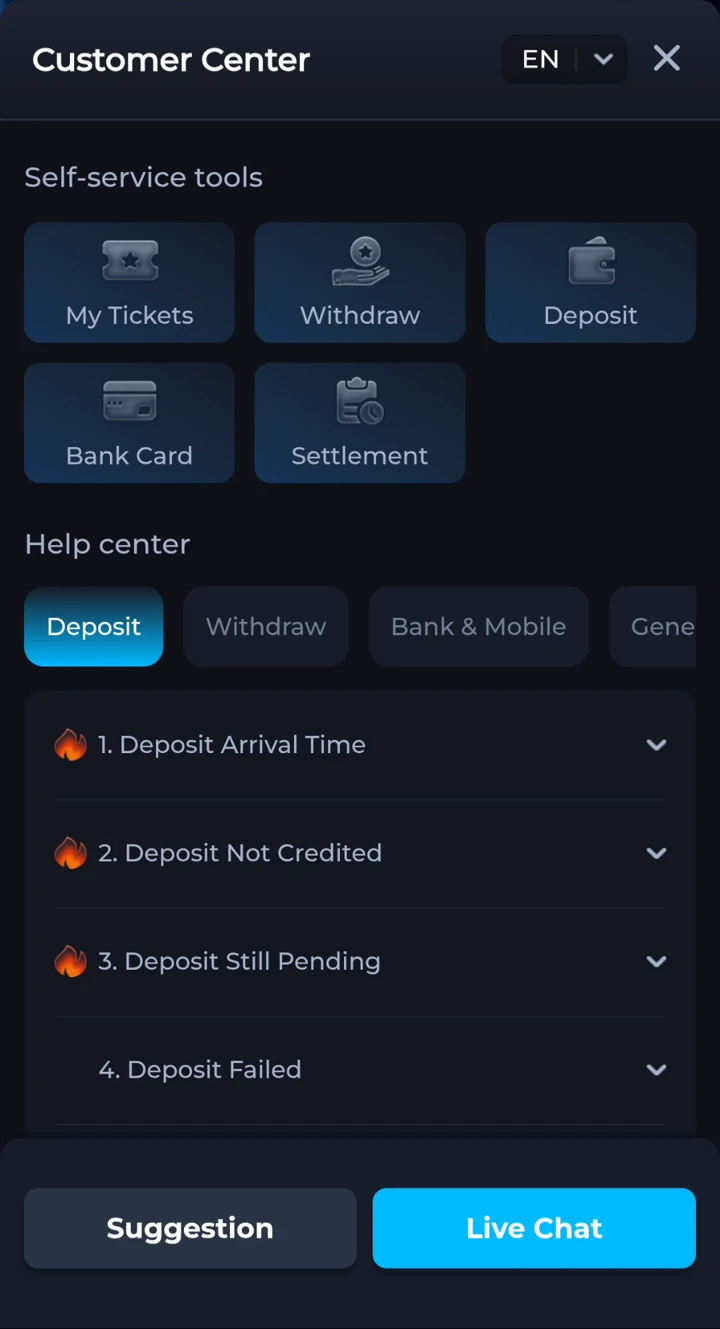
| Help with an account or match | Customer Center, Live Chat, My Tickets and Settlement routes | Use Dream11’s own support for a Dream11 account; COME support is a separate route |
Ready to try the COME side of the comparison? Open COME on your phone and choose the format you have just read about.
COME gives you several ways to ask for help from your phone. Open the account menu and choose Contact CS to reach Customer Center.
Check the current account conditions for deposits, withdrawals and offers. A support route helps you raise a problem; it does not make a result or payment unconditional.
These are concrete routes you can find and use when you need help. Keep account, match and transaction records inside the appropriate support process.
 Tap to enlarge
 Read the Fantasy guide for team contests and prediction cards, or the Sports guide for Cricket and Football event markets.
Use the COME download link and follow the installation guide. If COME is already installed, open it directly.
Follow the sign-in options shown by COME and the conditions for the selected game. Do not assume a Dream11 balance or account carries over.
Before you download, check the final page address, app identity and release details. Before any paid participation, check age and location eligibility, the entry amount, outcome rules and current withdrawal conditions. Set limits for responsible use.
Reference material: Dream11’s Android listing and Dream11’s Fantasy Cricket guide. Reviewed 8 September 2026. COME screenshots and support details are explained alongside the relevant sections.
COME is a separate new brand. This guide does not establish that COME is Dream11 renamed, owned by Dream11, or a migration of Dream11 accounts.
COME combines Fantasy predictions with a separate Sports area and Casino and Rummy navigation. It is worth exploring if you want that mix of experiences.
Do not assume that. Follow COME’s own sign-in and account instructions; the two brands are treated separately.
COME’s recorded Fantasy instructions include player-team contests, captain choices and a separate prediction flow. Use COME’s own sport and format rules.
The supplied mobile walkthrough shows Customer Center, Live Chat, My Tickets and Settlement Issues. Current account conditions still apply.
COME’s own How to Play recording describes selecting players within 100 credits, creating teams and joining contests. Its T20 scoring screen lists captain 2× and vice-captain 1.5×. Team selection is therefore a confirmed part of the recorded COME instructions, alongside predictions.
The useful comparison is the format and range of experiences: COME Fantasy includes teams and predictions, while COME Sports, Casino and Rummy have separate sections. Shared fantasy concepts do not establish a Dream11 partnership, account migration or identical rules.
Get the Android app if you need it, then open the category that matches your interest and read its current rules.
comeplaygo.com is an independent information and affiliate guide. Download buttons open an external partner page and may generate commission. This site does not host the APK or manage COME accounts or payments. 18+ · Local eligibility and responsible use.