
COME Rummy: Points, Deals & Coins
COME Rummy has its own lobby and card-table flow. Start by distinguishing Points from Deals, then check whether the lobby is using Cash or Coins.
Already have COME? Open the app on your phone. Get login help →
On this page
Read the COME Rummy lobby
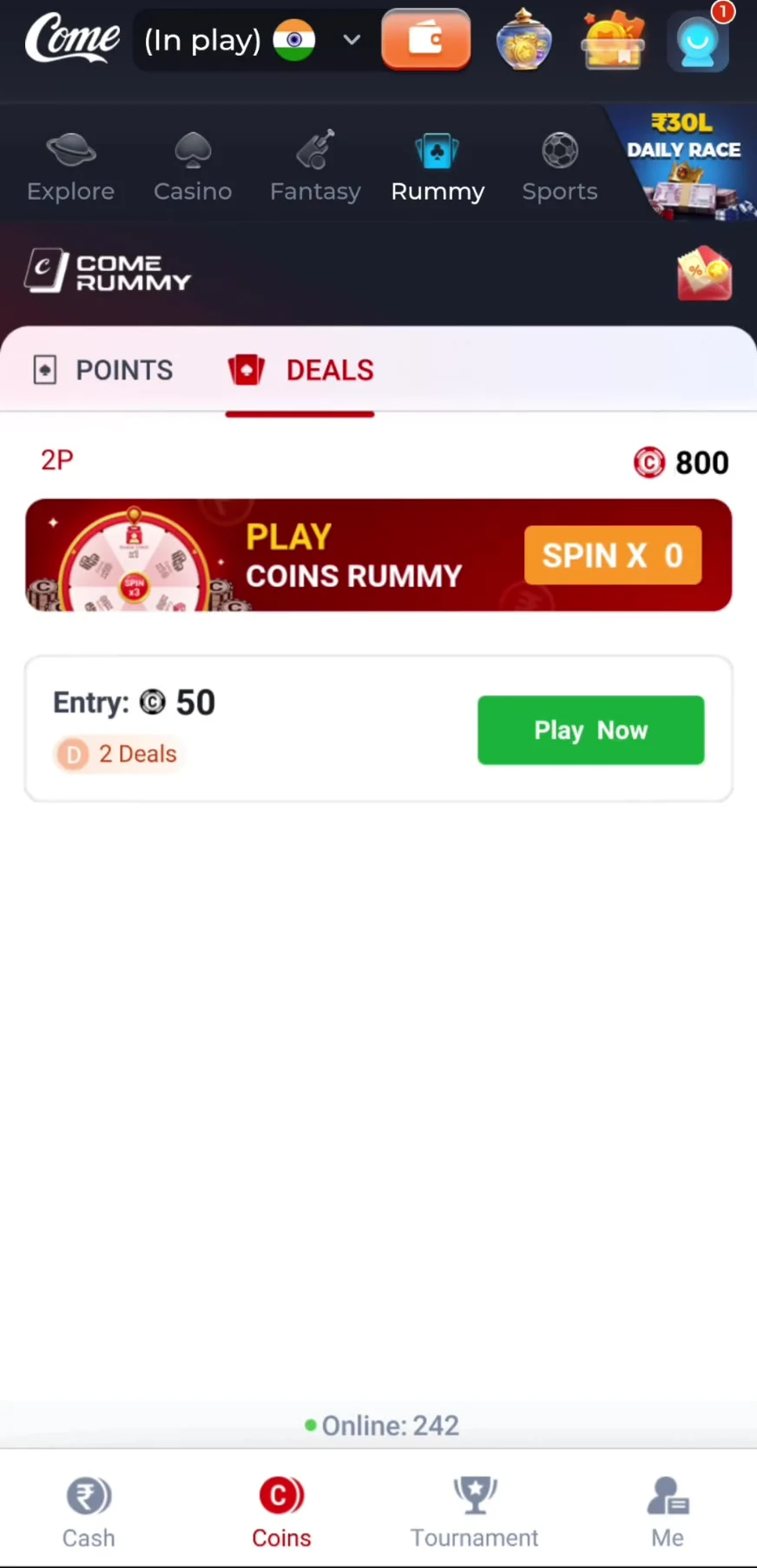
The mobile recording opens Rummy from COME’s top category row. The lobby shows POINTS and DEALS, with Cash, Coins, Tournament and Me along the bottom. The recorded Coins lobby is the context for the examples below.
The selected mode, entry amount and balance belong together. A number beside a coin symbol is not evidence of a cash balance or a withdrawal value.
 Tap to enlarge
 Points and Deals are different match formats
| Mode shown | What the recorded lobby displays | What to check before joining |
|---|---|---|
| Points | A 2–6-player label, entry amount and per-point value | The selected currency, per-point value and available balance |
| Deals | A 2-player label and a 2 Deals entry | The number of deals, entry currency and format rules |
The recording demonstrates a Coins Points table. It shows a Deals lobby but does not complete a Deals game, so this page does not claim a tested Deals result or publish an unverified settlement formula.
What the mobile card-table sequence shows
After the Coins Points entry is opened, the table loads in landscape orientation, displays the cards and offers controls including Sort and Drop. Later screens show a drop confirmation, a result panel and a Leave Table confirmation. These prompts have consequences; read the current amount and point cost before confirming.
The recorded drop prompt mentions 20 points for that table. It is an example from that session, not a universal Rummy penalty. This guide does not substitute a generic Rummy ruleset for the rules of your selected COME table.
Coins, bonuses and Cash
The recording shows a one-time Free Coins Bonus prompt and a Coins balance changing during play. Those are session-specific interface states. They do not establish a permanent sign-up offer, a conversion rate into cash or eligibility for everyone.
Fantasy Coins, Rummy Coins and wallet Play Coins have different contexts. Stay in the chosen lobby and read its own balance and reward details.
If a Rummy table does not load
- Allow the game update or loading screen to finish on a stable connection.
- Check whether an existing table or confirmation is still open before trying a new entry.
- Use the in-app record to see whether an entry was accepted. Avoid assuming a blank screen means no entry exists.
- For a disputed entry, capture the table, mode, currency and record, then use COME account support.
Frequently asked questions
Does COME Rummy have Points and Deals?
Both tabs appear in the recorded mobile lobby. The recording demonstrates Coins Points play and shows a two-deal lobby.
Are Rummy Coins the same as Fantasy Coins?
They appear in separate product areas. Do not assume they share value, transferability or redemption conditions.
Does the recording prove a permanent free-coins offer?
No. It shows an offer presented to that recorded account at that time.
About the screenshots and rules
Interface and rules reference: supplied mobile recording dated 31 August 2026, reviewed 10 September 2026. Available contests and rules can change. Read the terms shown for the match you choose.