
Meet Hero11 through the sport you follow
For readers who use our COME guides to understand sports and fantasy interfaces, Hero11 is another name worth getting to know. Its public website uses the description “India’s Fantasy Sports Super App” and gives Fantasy a prominent place in the main navigation. Cricket is the starting point in the Fantasy view we reviewed, with Football and Kabaddi available as neighbouring sport tabs.
This introduction focuses on that sports experience: how to recognise the brand, find a fixture and understand the different kinds of cards on screen. We reviewed the public, signed-out interface on 24 October 2026. Calling Hero11 a new brand to explore does not establish a launch date, and a visible sport tab does not mean every competition is available all year.
Start with the fixture, not just the team badge
An Indian cricket fan may follow the national side, the IPL, the WPL or a domestic competition. Those interests are a useful starting point when browsing a sports platform, but they are not a promise that Hero11 currently lists all of those events. Check the competition label attached to the actual match card.
The reviewed Fantasy page arranges fixtures as readable cards. The competition and format appear above the teams; a starting time or countdown helps distinguish an upcoming match from another fixture. This matters when the same countries or clubs meet several times in a series. A familiar team abbreviation alone may not identify the match you intended to open.
Read the format, competition, teams and timing together. If you are following an official schedule elsewhere, also compare the date and time zone before treating a platform countdown as your match-day plan. The interface is useful for finding an event; this article is not a live fixture feed.
Cricket, football and kabaddi in one sports view
Cricket, Football and Kabaddi were visible in the Fantasy navigation during our review. That gives a visitor a clear way to move between sports without confusing a general games catalogue with a match list. The page also showed the labels Recommended, Starting Soon and Popular above the fixtures.
These labels organise browsing. “Starting Soon” points your attention towards timing, while the other labels help you explore the list. They do not tell you that an event will produce a particular result. Available fixtures, countdowns and the order of cards can change between visits.
Football and kabaddi have their own match structures and terminology. Use the help and rules supplied for the chosen sport instead of carrying assumptions over from cricket. The same principle applies when moving from COME to Hero11: a familiar screen layout is useful for orientation, but it does not establish shared account details or identical product rules.
How the Hero11 interface is arranged
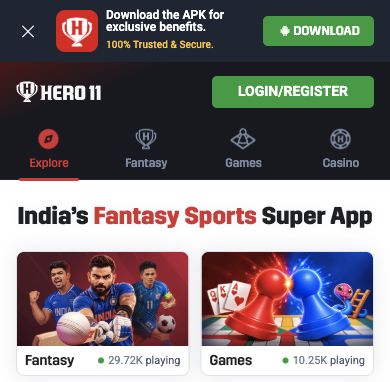
The public Hero11 header combines a white trophy-style HERO11 mark with a dark background and a green Login/Register button. Explore, Fantasy, Games and Casino appear as separate top-level destinations. For a reader interested in sporting events, Fantasy is the relevant place to begin looking at the match interface.
| Visible area | What it helps you identify |
|---|---|
| Explore | An overview with prominent Fantasy and Games panels. |
| Fantasy sport tabs | The Cricket, Football and Kabaddi browsing categories shown in the reviewed view. |
| Match cards | The competition, opposing teams and displayed starting time or countdown. |
| Suggested Predictions | Questions with their own Yes and No choices, separate from the fixture list. |
| My Matches and help | Navigation for personal match records and product explanations. |
A prediction question is different from a match listing
The reviewed Fantasy page placed Suggested Predictions above the sport tabs. Each card asked a particular question and showed Yes and No choices. Below that area, fixture cards identified the teams and competition. These are different pieces of information, even when both refer to the same match.
Read the whole question before interpreting a prediction card. For a fixture, first identify the match and then check the explanation for whichever activity appears after opening it. The name “Fantasy” by itself does not establish an eleven-player team-selection format, captain multipliers or a universal scoring system.
Hero11 also displayed How to Play, Points System and Help and Support. Those labels are useful places to look for the platform’s own explanations. A screenshot cannot replace the current rules, and a match card does not establish that live video streaming is included.
Where to learn more about the Hero11 website
If you want to understand the website before exploring its sections, the Hero11 website guide brings together explanations of the entry page, account-access screen, mobile options and public channels. It is an independent guide, rather than the platform operator. Its platform buttons lead to an external Hero11 destination.
That distinction is useful for a first visit. An information page can explain where a control sits, while account-specific questions belong with the service that runs the account. A COME login should not be assumed to work on Hero11 simply because some navigation labels look familiar.
For the COME side of that learning process, our Fantasy and Sports explanation shows why identifying the section matters. Learn the interface of each service on its own terms, then use its current information for the event you actually want to follow.
Quick questions from sports readers
Does Hero11 list only cricket?
No. The reviewed Fantasy interface also displayed Football and Kabaddi tabs. The events available within each sport can change.
Can I assume IPL or WPL fixtures will always be there?
No. Look for the current competition and match inside the platform. This overview does not confirm a permanent tournament catalogue or broadcasting rights.
Is this a hands-on account or payment review?
No. It is an introduction based on public navigation and saved interface images. We did not create an account, enter a contest or test payments. Adults should check the platform’s current eligibility requirements and rules before using any restricted activity.